Release 1.7.0
🎉 Haletale 1.7.0 Release — Recurring Invoices, Smart Filters & Invoice Overhaul
🚀 What’s New Features
🔁 Recurring Invoices — Automate, Track & Control
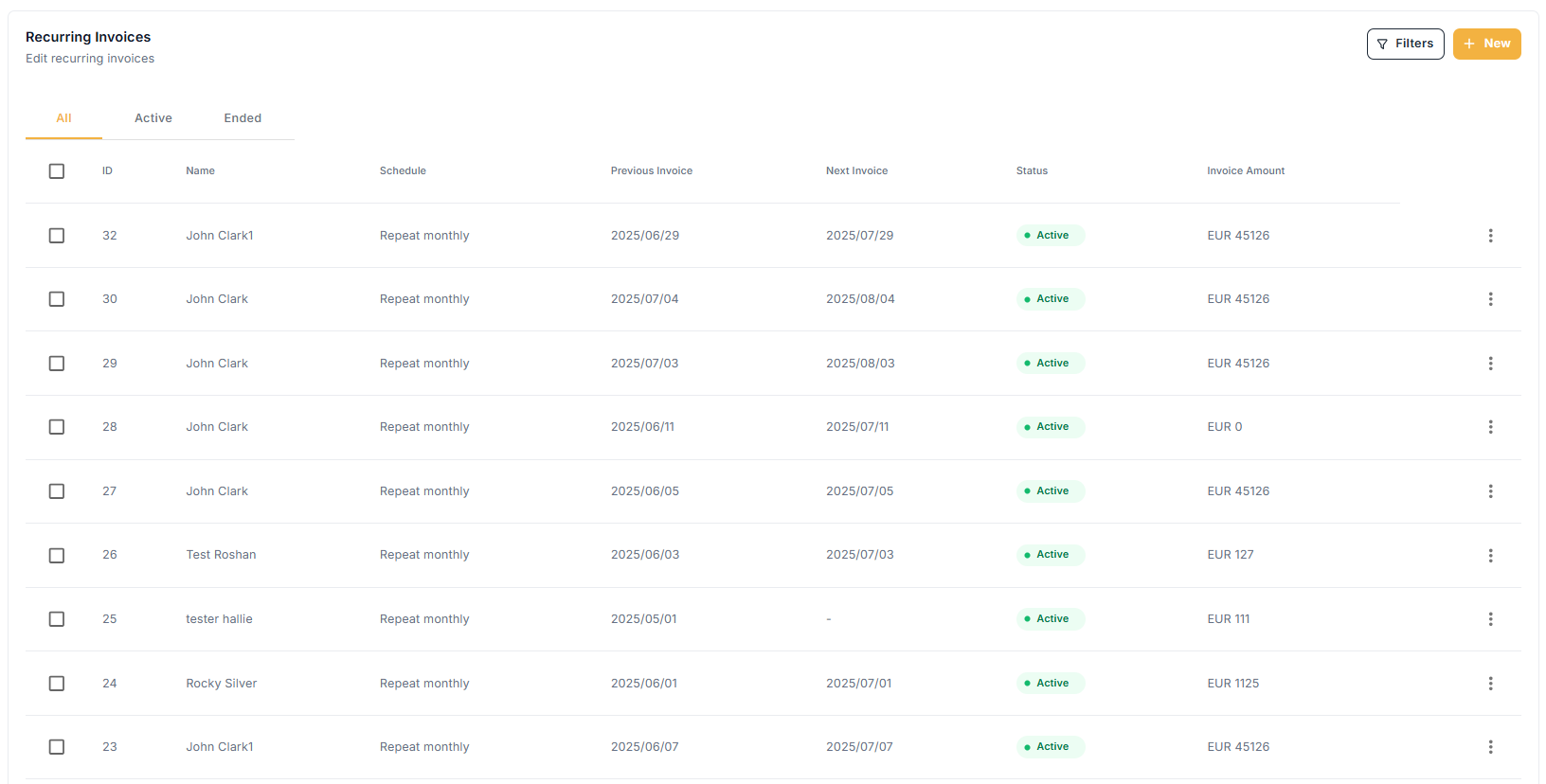
Say goodbye to repetitive manual invoicing!
What’s New:
A dedicated dashboard to manage all your recurring invoices.
Add recurring invoices independently of standard ones.
View, edit, delete, or end recurring invoices effortlessly.
Moved "days before generation" to the creation form for smarter context.
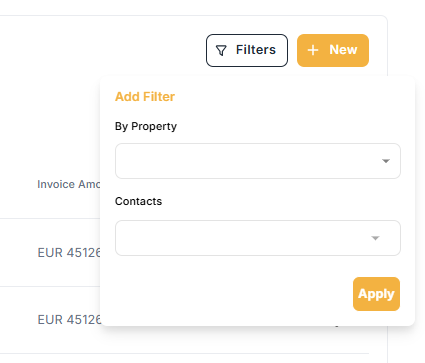
Filter recurring invoices by property or contact.
Why it helps:
This empowers users to automate billing, minimize errors, and have complete control over recurring invoices. Whether you manage tenants, properties, or long-term contracts, your invoice routine just got a major upgrade.
🔗 Quick-Create Modal: Choose Your Flow
Now when clicking “Create New” on the Invoice page, you get a popup to choose between a standard invoice or a recurring one.
Why it helps:
Reduces accidental invoice creation and offers a more intentional, focused workflow for different billing needs.
📤 Export Invoices & Transactions to CSV (Ticket #223)
Available directly from both Invoices and Transactions pages.
Why it helps:
Quickly share, analyze, or back up your financial data externally.
🧾 Invoice Page Overhaul— Inspired by Wave
A major usability upgrade modeled after modern invoicing tools.
What’s New:
Edit/delete recorded payments directly from the view page.
Partial payments are now auto-detected by amount.
Entire invoice rows are clickable for quick access.
Removed edit option for received invoices in list view (still editable via view page).
Why it helps:
Provides a cleaner, more intuitive invoice workflow, especially when reconciling transactions and improving financial accuracy.
✨New Improvements
📥 Inbox & Notification Overhaul (Ticket #511)
Messages now appear in the top-right dropdown.
Improved visual hierarchy for notification content.
Why it helps:
Ensures timely access to important updates, reducing communication delays.
🏠 Property Deletion Flow Polished
New modal design.
Added loader for better real-time feedback.
Why it helps:
Eliminates confusion during deletion and creates a safer, more predictable experience when cleaning up property data.
🔒 Tenant Password Management
Tenants can now change their password from the top-right dropdown.
Why it helps:
Reduces dependency on admins and empowers users with self-service security controls.
📊 More Accurate Filters
Updated Tenant Filter in Invoices to show all related contacts.
Transaction filter now includes all categories, not just parents. (Ticket #557)
Why it helps:
Makes sure no data is left out when you're filtering, especially during financial reviews or audits.
➕ Renter Applications Update
Added a clear “Add Renter” button to speed up onboarding.
Why it helps:
Simplifies tenant addition during application reviews—especially useful for leasing agents managing bulk applications.
🧾 Add/Edit Listing Streamlined
"Additional Amenities" is now split into:
Amenities (grouped features)
Additional Info 1–4 (custom text fields)
Why it helps:
Improves clarity and separates general property features from unique selling points.
📄 Docuseal UX Enhancements
🔙 Fixed confusing back button behavior.
💾 Added Save button at the top.
⬅️ Improved side nav layout to reduce misclicks.
Why it helps:
Delivers a smoother, more predictable workflow when working with templates and PDFs.
📱 Mobile Listing Page Fixes
🛈 Improved behavior of
i(info) buttons.🛠️ Fixed overlapping, unresponsive tooltips, and dropdown issues.
Why it helps:
A more reliable and readable mobile experience, especially when users are on the move.
🧠 Smarter Filtering & Entry Fields
Filters now include all relevant contacts & categories
Removed “parent category” field when split transactions exist
Expense form now supports single user type
🐞 Key Bug Fixes
🧹 Homeowner Report: Fixed a bug where going back and generating a report again caused data corruption.
🔢 Invoice Creation: Fixed the issue where
0couldn't be removed in multi-line entries.
Why it helps:
Ensures your reports and invoices reflect accurate data—no more frustrating input bugs.